Interface preview
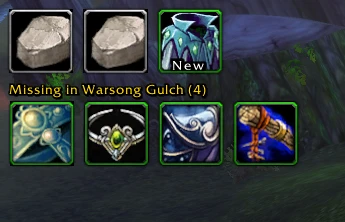
Author screenshot · Valorless / ASDrops · Original on GitHub

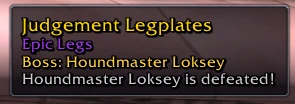
Author screenshot · Valorless / ASDrops · Original on GitHub

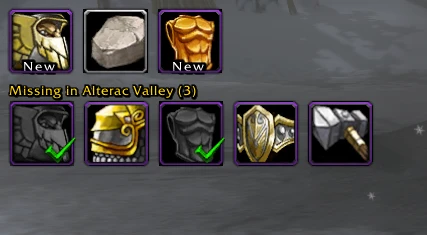
Author screenshot · Valorless / ASDrops · Original on GitHub

Screenshots show the interface at the time the author published them; later releases may look different.
What is it useful for?
Use the compact loot bar to recall what dropped this run, then compare the missing row with the items you still want from that zone. Check older collection entries manually before relying on the remaining count.
- Up to 20 loot icons show rarity, stack count and tooltips; boss kills with no reward get an A Pretty Rock placeholder.
- v1.5.7 can keep collected items visible in boss order, with optional greyscale and green checks.
- Reads loot chat and available SDUI loot frames; the backpack mirror does not change the real inventory.
Get started after installation
Install the addon using the current repository instructions, then follow the steps below. Commands and UI may change after an update.
- Use ASDrops-v1.5.7.zip from Releases. Copy the ASDrops folder into the game’s active AddOns directory, then restart or reload and enable it.
- Open /asdrops or its minimap button. Drag each row by an icon, resize with the bottom-right grip, and right-click to lock it.
- Enable Show collected items if you want completed targets to remain visible, then choose greyscale and green checkmarks. Shift-left-click a missing-row icon to mark it collected.
Useful tips & limitations
v1.5.7 documents AddOns-folder installation. It learns from loot messages and windows; it cannot read your existing game collection. Check Scholomance against the current game’s drop list.
- Shift-right-click removes an item from the current zone’s list; it is different from marking it collected. /asmissing list shows missing entries. The backpack mirror is visual only.
If a game update causes a problem, disable the most recently added addon and report the game version, addon version and exact error to its author.
Questions
What does ASDrops do?
Track this run’s drops and a per-zone list of missing items, with manual collection marks and optional collected-item checks.
What should I know before using it?
v1.5.7 documents AddOns-folder installation. It learns from loot messages and windows; it cannot read your existing game collection. Check Scholomance against the current game’s drop list.
Where can I find updates or report a problem?
Use the author’s repository and issue tracker linked below. Include your game version, addon version and full error message when reporting a problem.
Author & original sources
Features and instructions follow the author’s project below. Download addon packages through the author’s links.
- Valorless/ASDrops — repository & README
- Author issue tracker
- Author announcement on Discord
- ASDrops v1.5.7 release
- ASDrops README at e1f0f4a65
- Author screenshot source — Valorless’s 2 November preview: two A Pretty Rock placeholders, one item marked New, and four missing Warsong Gulch items.
- Author screenshot source — Valorless’s tooltip preview identifies Judgement Legplates as Epic Legs and names Houndmaster Loksey as the boss.
- Author screenshot source — Valorless’s 2 November collected-item preview: five Alterac Valley icons include two grey items with green checks; the missing count is three.
- Browser and desktop installation guide