Azeroth Survivors addons
Addons are optional tools that add damage meters, build tracking or interface features to the game. Find one for your next run.
21 community projects · Updated 2 Nov 2026
All 21 projects
Grouped by purpose, not ranked
Azeroth Stats
Keep local run history, inspect combat reports, compare retained runs and customize a statistics bar.
Overview & how to useAZS Max Hit
Inspect each ability’s biggest hit, critical hit and one-second burst, alongside its run total and a co-op party summary.
Overview & how to useASTinyPlates
Shrink ordinary enemy nameplates while keeping boss and Guardian plates readable, with debuff timers where available.
Overview & how to useLocal Clock
Add a movable clock with 12/24-hour display and a manually selected supported timezone.
Overview & how to useKeijinUI
Combine movable HUD frames, combat meters, boss timing, Guardian directions, character statistics and a jewelry diary.
Overview & how to useBlackwellUI
Use a configurable HUD with combat meters, boss schedules, objective radar, nameplates and round or classic styling.
Overview & how to useSurvivor UI
Arrange run tracking, spell and jewelry lists, combat meters and nameplates with the optional companion addon Survivor Plates.
Overview & how to useAzeroth FieldKit
Select modular combat text, health and boss frames, damage meters, loadout cards and chest or Guardian-lair markers.
Overview & how to useSurvivorsForge
Manage desktop addons: browse, install, update and remove packages from an addon catalogue, GitHub repositories or local ZIPs.
Overview & how to useASBuilder
Plan spells and jewelry across Early, Mid, End and Endless stages, share a build code and follow its priorities during a run.
Overview & how to useAzerloot
Browse boss drops and jewelry, plan builds, track a wishlist and keep a chronicle of recent runs. Includes boss and encounter warnings.
Overview & how to use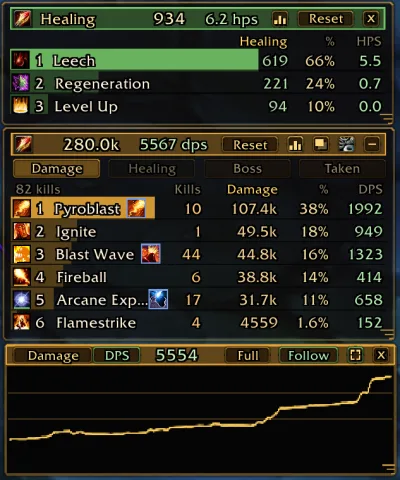
AZS Spell Meter
View per-spell damage, healing, boss damage, damage taken and co-op party statistics, with an adjustable DPS time window.
Overview & how to useTotemWatch
Track active totems against their cap, with a duration display and guidance based on totem occupancy.
Overview & how to useEnemyCounter
Show the current enemy count in a small draggable display that remembers its position.
Overview & how to useSurvivorsDragonUi
Replace the HUD with movable frames, run and boss tracking, and guardian and cache guides.
Overview & how to usenfUI
Adjust player and target frames, nameplates and compact statistics, with a directional compass.
Overview & how to useBordo UI
Combine combat and party frames with a boss timeline, a jewelry/build panel and a death recap.
Overview & how to use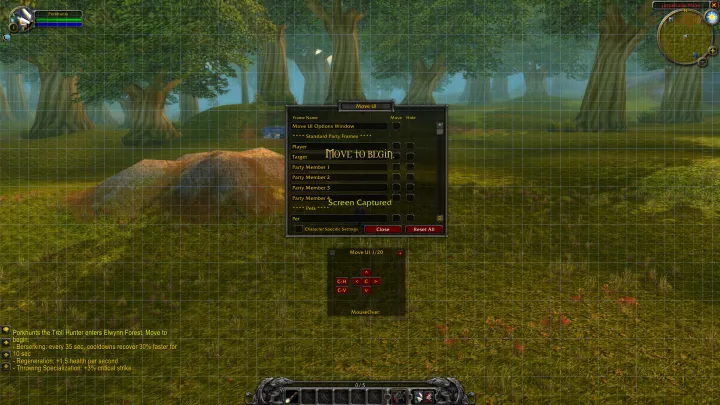
Move UI
Move or hide supported UI frames, using an alignment grid and reset controls.
Overview & how to useLuckyOdds
Estimate card rarity odds from luck and level, and mark battleground caches and guardian lairs on the minimap.
Overview & how to useBigCursor
Enlarge the native cursor artwork without requiring Survivor UI.
Overview & how to useECProbe
Inspect game globals, tables and UI frames to investigate the addon API.
Overview & how to use
No matching addons
Try a shorter search or reset the category.
About Azeroth Survivors addons
What is an addon in Azeroth Survivors?
An addon is an optional tool loaded by the game to add interface features or information, such as a damage meter, a build tracker or map markers. It is separate from the game download and is not required to play.
Which type of addon should I choose?
Choose a build planner for skill and equipment priorities, a damage meter for combat statistics, or a HUD addon to change the interface. Map helpers show specific locations or markers. Start with the feature you need rather than installing several overlapping tools.
Do addons work in the browser version?
The original browser game supports addon ZIP installation through Options → AddOns → Install AddOns. Individual addon compatibility still varies; check its author’s instructions. A project documented for Windows should not automatically be assumed to work in the browser.
Where should I download addons, and are they tested here?
Use the original author’s repository and its installation or release links. This directory does not host addon packages. We have checked the listed author documentation, but have not installed and playtested every addon on the current game version.
Know what you are installing
Each article links to its author’s repository and separates documented features from gameplay testing. We have not playtested every addon and do not host installation packages. Screenshots are attributed author material.