What is it useful for?
AZS Spell Meter helps you inspect which spells contributed to a run, rather than relying on one total damage number. The same view can answer different questions depending on the DPS time window you select.
Screenshots & image sources
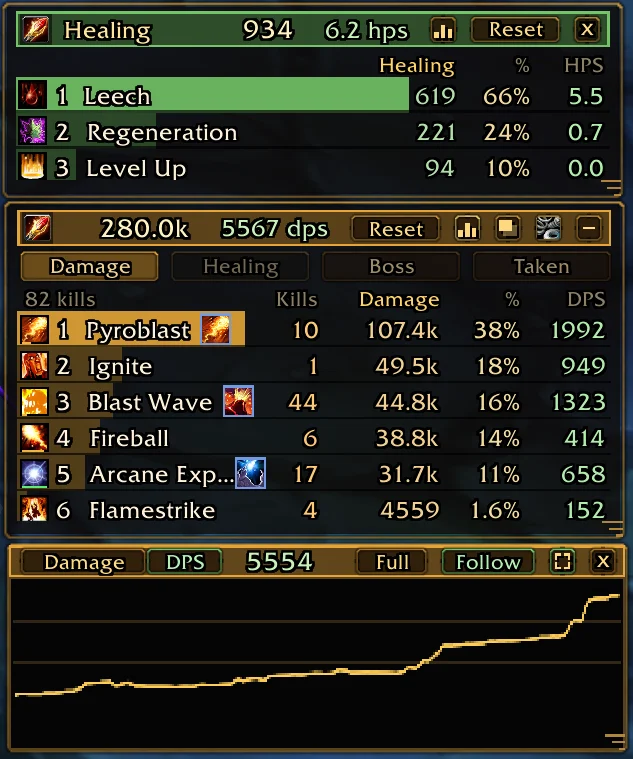

Shows the author’s published interface, not our test of the current patch. Open the image for a larger view.
Get started after installation
Install the addon using its current repository instructions first. These steps follow the author’s documentation; check for changed commands or UI after an update.
- Use the author’s release ZIP. On desktop, confirm the path ends in AddOns/AZSSpellMeter/AZSSpellMeter.toc, then relog as instructed.
- Type /azsm to show the meter. Choose Damage, Healing, Boss, Taken or Party below the title; Party is for co-op sessions.
- Open the title-bar gear and choose the DPS window before comparing results. The documented default looks back 10 seconds; Since the start uses the whole run or boss fight.
- Click Kills, Damage or DPS to sort the rows. Hover a spell to inspect hits and criticals, or hover the total for build statistics.
- Right-click a view button to put that view in a separate window. If a window goes off screen, use /azsm resetpos.
Useful tips & limitations
Damage uses the game’s meter. Use the same DPS time window when comparing runs; burst and whole-run averages differ.
- Damage totals and spell shares come from the game’s own meter; changing the DPS window changes the rate being compared, not what a whole-run total means.
- Proc damage can be grouped under the spell actually cast. A small proc button provides its own details.
- The built-in Damage Done meter is hidden while this addon’s main window, bubble or extra window is open, and restored afterward if previously enabled.
If a game update causes a problem, disable the most recently added addon and report the game version, addon version and exact error to its author.
Questions
What does AZS Spell Meter do?
View per-spell damage, healing, boss damage, damage taken and co-op party statistics, with an adjustable DPS time window.
What should I know before using it?
Damage uses the game’s meter. Use the same DPS time window when comparing runs; burst and whole-run averages differ.
What has this guide verified?
This guide checked author documentation and public image material. We have not installed the addon or completed a current-patch gameplay test. Features and instructions are based on the author’s documentation.
Author & original sources
This is an independent fan guide, not the addon author or an official download host. Features and instructions are based on the project below; obtain packages through its author’s links.