Interface preview
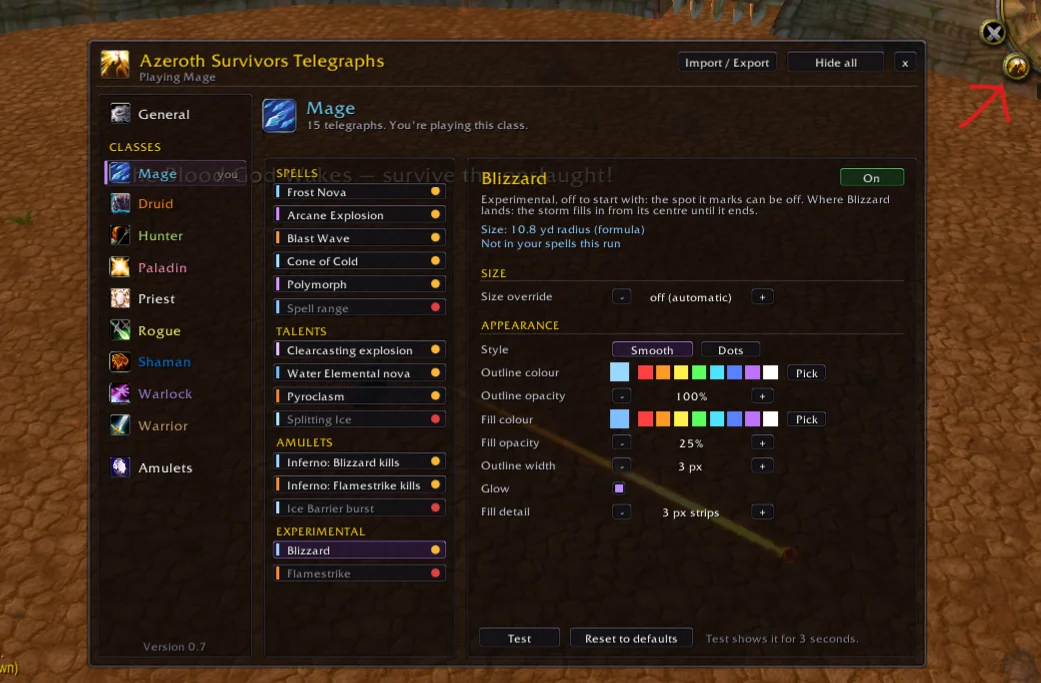
Author screenshot · The Ferengi · Original on GitHub
Screenshots show the interface at the time the author published them; later releases may look different.
What is it useful for?
Draw your own spell areas, ground effects and co-op revive range in the world. Supported effects vary by class.
Get started after installation
Install the addon using the current repository instructions, then follow the steps below. Commands and UI may change after an update.
- Download AzerothSurvivorsTelegraphs-0.8.1.zip from the release. Unpack it under benilla-config/AddOns so AzerothSurvivorsTelegraphs.toc sits inside the AzerothSurvivorsTelegraphs folder. Start the game and enable the addon at character select.
- Open /ast or the minimap button. Start with one spell you already use, such as Holy Wrath or Consecration on Paladin. Select when it appears and adjust color, opacity and outline.
- For supported spells, the addon reads area from your live tooltip. Use Import / Export to share the marker settings for one class or all classes.
Useful tips & limitations
Some spells aimed at groups, including Blizzard and Rain of Fire, are off by default under Experimental. The author reports partial testing and coverage for set-bonus effects.
- If Priest Telegraphs is enabled, it draws overlapping Priest effects. Disable one of the two addons if you want a single set of controls.
If a game update causes a problem, disable the most recently added addon and report the game version, addon version and exact error to its author.
Questions
What does Azeroth Survivors Telegraphs do?
Draw your own spell areas, ground effects and co-op revive range in the world. Supported effects vary by class.
What should I know before using it?
Some spells aimed at groups, including Blizzard and Rain of Fire, are off by default under Experimental. The author reports partial testing and coverage for set-bonus effects.
Where can I find updates or report a problem?
Use the author’s repository and issue tracker linked below. Include your game version, addon version and full error message when reporting a problem.
Author & original sources
Features and instructions follow the author’s project below. Download addon packages through the author’s links.
- zac-omar/AzerothSurvivorsTelegraphs — repository & README
- Author issue tracker
- Author announcement on Discord
- The Ferengi: set-bonus coverage
- Azeroth Survivors Telegraphs v0.8.1 release
- Azeroth Survivors Telegraphs v0.8.1 README
- Author screenshot source — The Ferengi’s 5 November v0.7 preview shows Blizzard selected under Experimental, with its appearance controls on the right.
- Browser and desktop installation guide