Interface preview
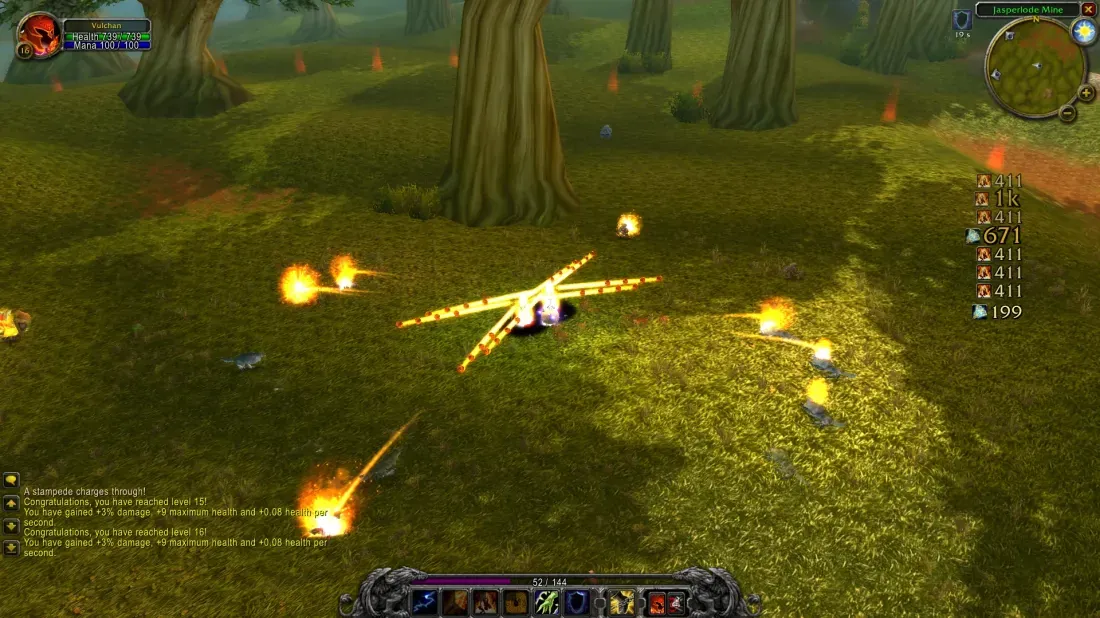
Author screenshot · Vulchan · Original on GitHub
Screenshots show the interface at the time the author published them; later releases may look different.
What is it useful for?
Choose this when floating numbers cover the fight and you want a small, movable combat-text area. It has saved vertical and horizontal layouts, overall scaling and optional spell icons.
- Hold CTRL to reveal the layout-sized drag area; release the mouse button to save its position.
- Scale numbers, icons, spacing and animation distance together from 50% to 200%.
- Use /vct icons on or off; unidentified sources keep their numbers without an icon.
Get started after installation
Install the addon using the current repository instructions, then follow the steps below. Commands and UI may change after an update.
- Close the game and put the release’s VulchansCombatText folder in its AddOns directory, replacing the older copy if present. Launch the game and start a run.
- Hold CTRL to show the outlined positioning area, then left-click and drag inside it. Release the mouse button to save the position.
- Choose /vct vertical or /vct horizontal. Use /vct scale 100 for normal size; documented values range from 50 to 200. /vct icons on and /vct icons off toggle icons.
Useful tips & limitations
The v0.4.14 README documents AddOns-folder installation. The author’s 4 November reply treats a minimum-damage filter as a feature request.
- An incoming hit can appear without a source icon. The README also keeps numbers visible when a spell cannot be identified from the message or spellbook.
If a game update causes a problem, disable the most recently added addon and report the game version, addon version and exact error to its author.
Questions
What does Vulchan’s Combat Text do?
Move floating combat numbers into a vertical stack or horizontal row, with optional spell icons and a saved size and position.
What should I know before using it?
The v0.4.14 README documents AddOns-folder installation. The author’s 4 November reply treats a minimum-damage filter as a feature request.
Where can I find updates or report a problem?
Use the author’s repository and issue tracker linked below. Include your game version, addon version and full error message when reporting a problem.
Author & original sources
Features and instructions follow the author’s project below. Download addon packages through the author’s links.
- Vulchan/Vulchan-s-Combat-Text — repository & README
- Author issue tracker
- Author announcement on Discord
- Vulchan’s Combat Text v0.4.14 release
- Vulchan’s Combat Text README
- Author screenshot source — Vulchan’s author preview, posted 4 November 2026. Combat text and spell icons form a vertical column on the right; the game version is not visible.
- Browser and desktop installation guide