Interface preview
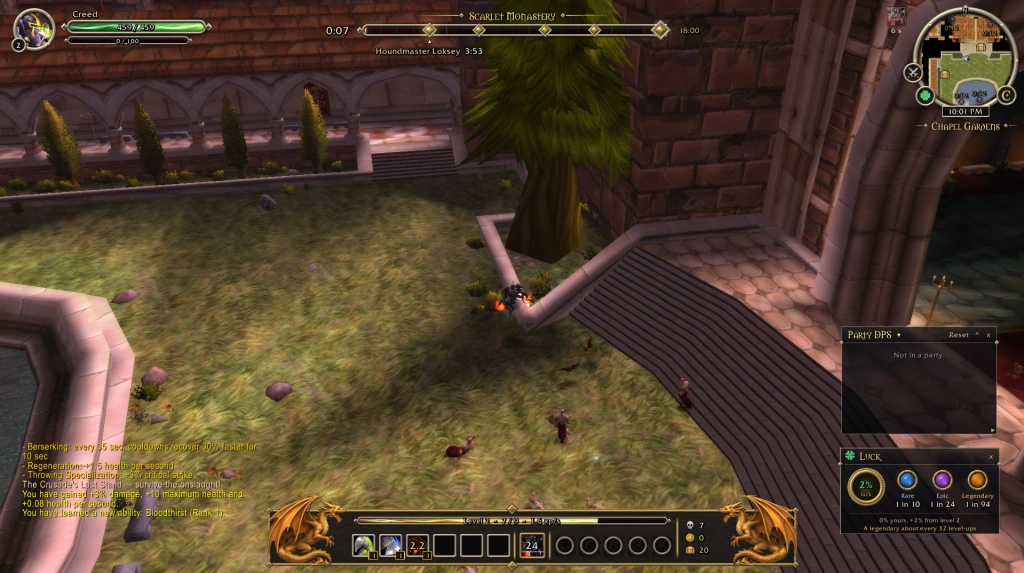
Author screenshot · Creed · Original on GitHub
Screenshots show the interface at the time the author published them; later releases may look different.
What is it useful for?
Creed UI groups the run’s boss schedule, character frames and combat information in a dark-and-gold HUD. Choose the panels you need, then position them with its movement controls.
- Boss countdowns and skull markers help locate bosses and Guardians.
- Move, resize or switch off individual HUD parts; /creed opens settings.
- The author’s language list includes eleven languages; choose Chinese in options or with /creed language zh.
Get started after installation
Install the addon using the current repository instructions, then follow the steps below. Commands and UI may change after an update.
- Download CreedUi-1.14.0.zip through the link in the release text, rather than Source code. Locate the running game’s addon folder and unpack the CreedUI folder; its documented layout is Interface/AddOns/CreedUI/CreedUI.toc.
- Open /creed or the C button at the minimap edge. Choose which HUD parts to show, move or resize.
- Use /creed move to free frames, then /creed lock to lock them. Select the language in options or with /creed language <code>; auto follows the game.
Useful tips & limitations
Use the author-linked CreedUi-1.14.0.zip in the release description. The Source code download is a different snapshot. Keep the addon folder named CreedUI.
- The author lists eleven languages, including Chinese. /creed reset restores frame positions. The documented installation is a folder workflow; check the author’s current instructions for your platform.
If a game update causes a problem, disable the most recently added addon and report the game version, addon version and exact error to its author.
Questions
What does Creed UI do?
Arrange boss timers and skull markers, player and party frames, combat meters and a configurable minimap in one HUD.
What should I know before using it?
Use the author-linked CreedUi-1.14.0.zip in the release description. The Source code download is a different snapshot. Keep the addon folder named CreedUI.
Where can I find updates or report a problem?
Use the author’s repository and issue tracker linked below. Include your game version, addon version and full error message when reporting a problem.
Author & original sources
Features and instructions follow the author’s project below. Download addon packages through the author’s links.
- CreedASui/CreedUI-for-AS- — repository & README
- Author issue tracker
- Author announcement on Discord
- Creed UI: author-linked 1.14.0 player package
- Creed UI release description and package link
- Creed: download-link reply, 4 November
- Creed UI README
- Author screenshot source — Creed’s v1.14.0 update preview, posted 3 November. Boss timing sits above the run, with the skill bar below and Party DPS and luck windows on the right.
- Browser and desktop installation guide