Interface preview
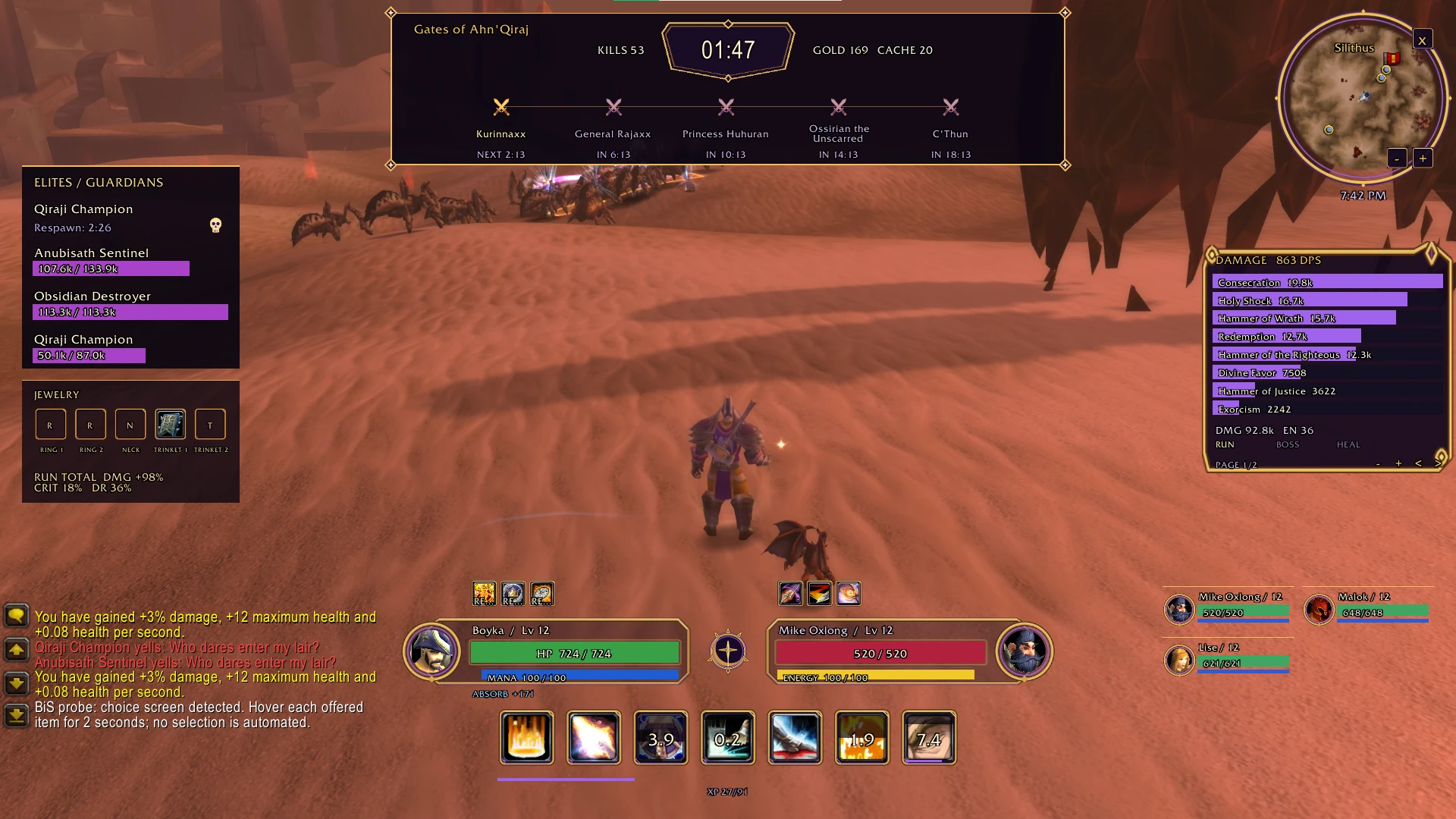
Author screenshot · Rehard / challangeguild-ai/HolyLightEclipse · Original on GitHub

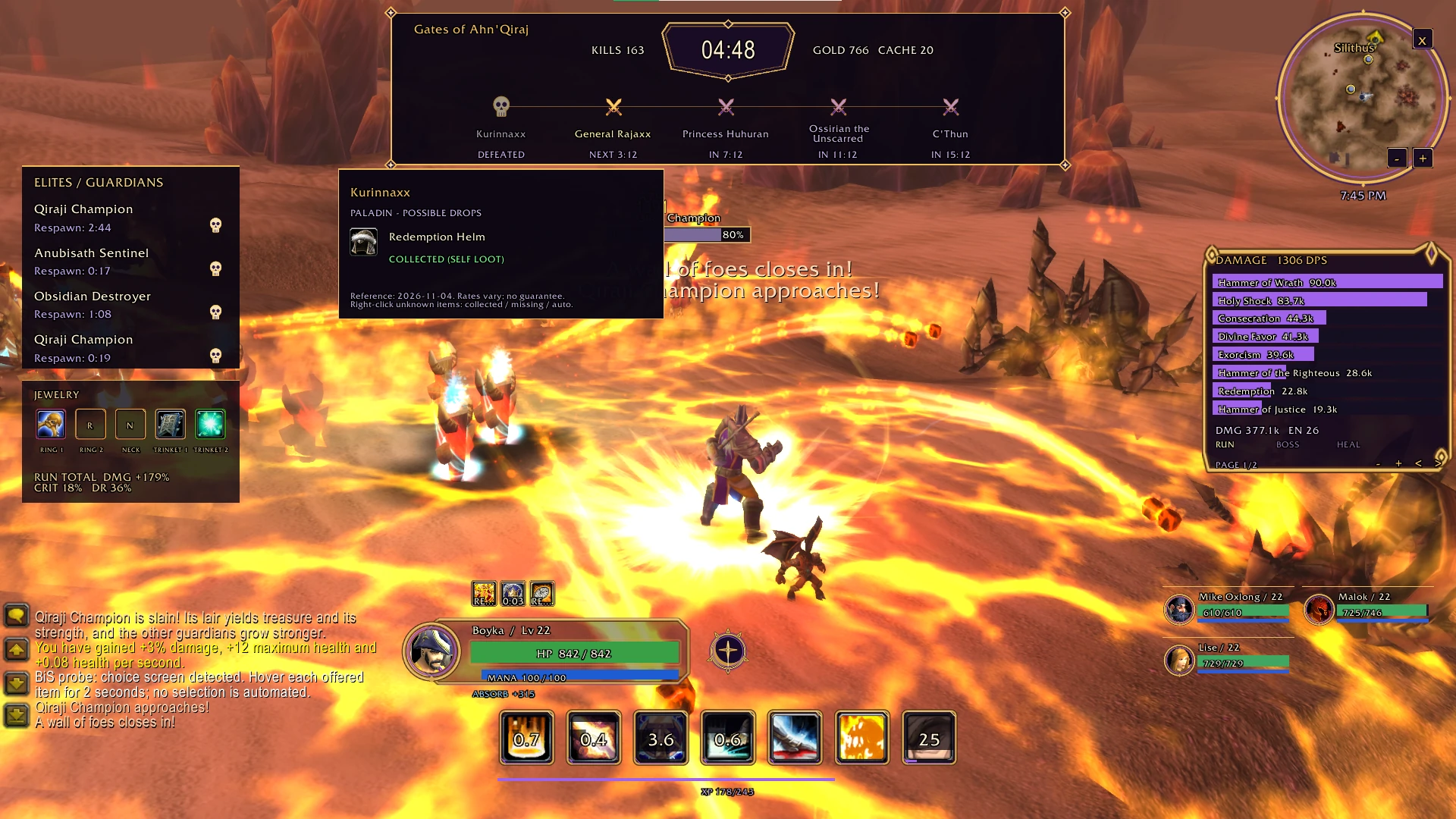
Author screenshot · Rehard / challangeguild-ai/HolyLightEclipse · Original on GitHub

Screenshots show the interface at the time the author published them; later releases may look different.
What is it useful for?
Holy Light × Eclipse brings the run clock, boss schedule and combat readouts into a matching gold-and-violet layout. Use the upper timeline to watch the next boss, then hover its name or icon to look up possible gear for your class. The two previews show Rehard’s v0.9.5 desktop gameplay from 4 November 2026.
- Player and mirrored target frames display health, resources and auras; compact ability icons show current-run cooldowns.
- The upper panel combines run time, kills, gold, next chest price and boss timing. Separate bars show boss health; the left list tracks elites and guardians.
- Loot previews cover 65 bosses and nine classes, separating observed acquisitions from manual collection marks.
- Move the combat meter, choose RUN/BOSS/HEAL, set 4 to 16 visible rows, change width and page through results.
- Five jewelry slots, an observed-item diary, frames for up to four teammates and a matching minimap skin complete the layout.
Get started after installation
Install the addon using the current repository instructions, then follow the steps below. Commands and UI may change after an update.
- Download HolyLightEclipse-0.9.5.zip from the release links below. Close the game, open its AddOns folder and extract the HolyLightEclipse folder there. Inside AddOns, the HolyLightEclipse folder must directly contain HolyLightEclipse.toc. Disable overlapping full HUD replacements.
- For the development client, the folder is benilla-config/AddOns/. An Interface-based loader instead uses Interface/AddOns/HolyLightEclipse/. When updating, replace the old addon folder and keep your saved settings.
- Open the controls with /hle. Use /hle unlock to position supported panels, then /hle lock. The meter stays draggable; /hle meter rows 10 and /hle meter width 340 adjust its size.
- During a run, hover a boss name or icon for possible class drops. Right-click an unconfirmed item to cycle collected, missing and automatic/unknown. This does not overwrite confirmed self-loot or equipped-item evidence.
- Switch statistics with /hle meter run, /hle meter boss or /hle meter heal. Use /hle damage and /hle healing for optional combat text, /hle status for diagnostics, or /hle off to disable the HUD and restore the native elements it owns.
Useful tips & limitations
v0.9.5 documents desktop installation; browser compatibility is unverified. Its loot reference is dated 4 November 2026. Unknown collection status does not mean an item is missing.
- Use the packaged release ZIP. The declared Interface 11200 targets the Azeroth Survivors API; it does not establish compatibility with vanilla or modern World of Warcraft.
- Loot is a static reference for permanent class gear, without drop rates or guarantees. It does not cover every random ring or trinket roll, and the diary cannot import your full historical collection.
- Boss countdowns start with the active run schedule and pause with the game. Before a run, --:-- avoids displaying an assumed schedule.
- Threat colours and combat text depend on supported client data. Received-healing feedback follows increases in effective healing, without predicting individual casts or displaying overhealing.
- The supplied screenshots show desktop play; their exact game build was not recorded. Visible BiS probe chat comes from a separate diagnostic tool. The linked English interface guide is an AI-edited explanatory illustration.
If a game update causes a problem, disable the most recently added addon and report the game version, addon version and exact error to its author.
Questions
What does Holy Light × Eclipse do?
A gold-and-violet HUD by Rehard with a boss timeline, class-specific loot previews, elite tracking, co-op frames and a RUN/BOSS/HEAL combat meter.
What should I know before using it?
v0.9.5 documents desktop installation; browser compatibility is unverified. Its loot reference is dated 4 November 2026. Unknown collection status does not mean an item is missing.
Where can I find updates or report a problem?
Use the author’s repository and issue tracker linked below. Include your game version, addon version and full error message when reporting a problem.
Author & original sources
Features and instructions follow the author’s project below. Download addon packages through the author’s links.
- challangeguild-ai/HolyLightEclipse — repository & README
- Author issue tracker
- Holy Light × Eclipse v0.9.5 release
- HolyLightEclipse-0.9.5.zip
- v0.9.5 README
- Original gameplay screenshots; English guide labelled as an AI-edited illustration
- Boss-loot reference and attribution
- Author screenshot source — Rehard’s v0.9.5 desktop gameplay, 4 November 2026: the full HUD and co-op frames in Gates of Ahn'Qiraj.
- Author screenshot source — Rehard’s v0.9.5 desktop gameplay, 4 November 2026: hovering Kurinnaxx shows Redemption Helm marked COLLECTED (SELF LOOT).
- Browser and desktop installation guide