Interface preview
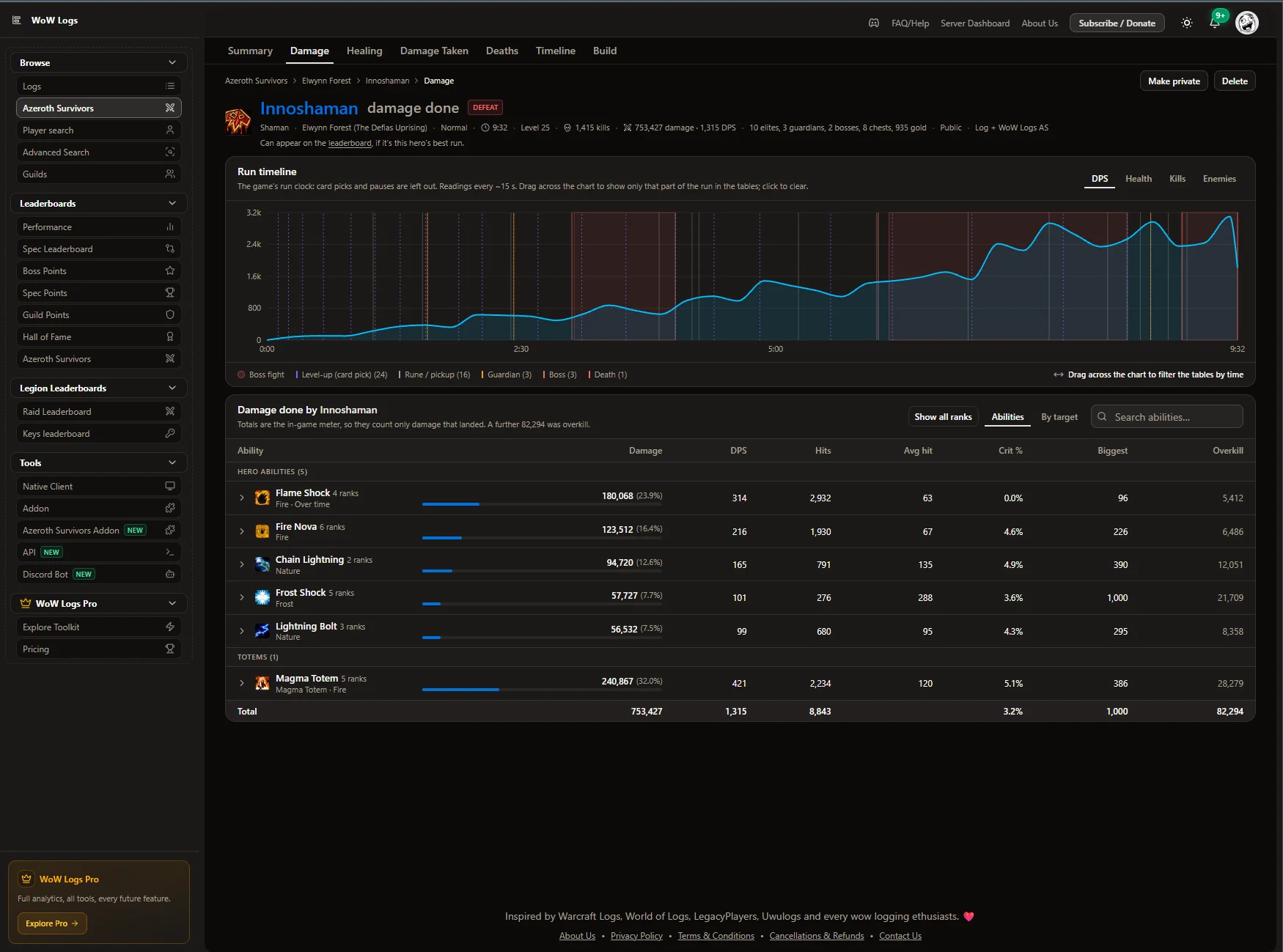
Author screenshot · Inno (rksdevs) · Original Discord post
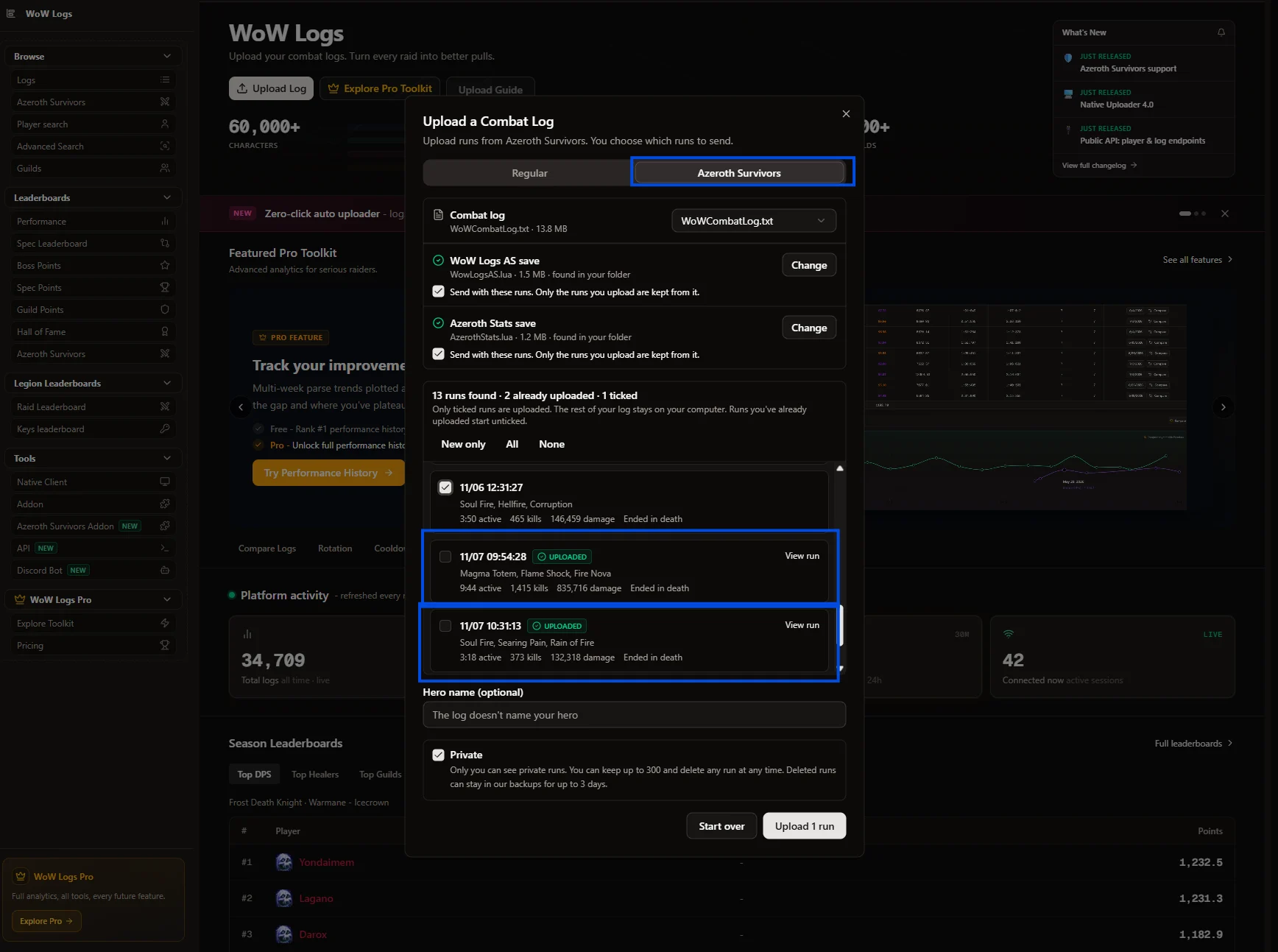
Author screenshot · Inno (rksdevs) · Original Discord post
Screenshots show the interface at the time the author published them; later releases may look different.
What is it useful for?
WoW Logs AS is for looking back at a run, not for watching numbers during it. In the game it only records. The report is built on the WoW-Logs website from the game’s combat log plus the addon’s save, which adds what the log leaves out: healing, the game’s exact damage totals, spell ranks, pets and your final build. Keep a live meter such as AZS Spell Meter for the run itself. Azeroth Stats can run alongside it; upload its save too and the report gains an Azeroth Stats page.
- The report has Summary, Damage, Healing, Damage Taken, Deaths, Timeline and Build pages. Drag across the timeline to look at one stretch, such as a boss fight.
- The addon sends nothing itself: addons cannot make web requests, so the data stays in SavedVariables until you upload it. Co-op recordings can include your companions’ names.
- A private run can be viewed and downloaded only by you. A public run, with its log and attached addon data, can be downloaded by anyone.
- The leaderboard takes solo runs that ended on the result screen and were uploaded with addon data. The game writes its combat log in batches, so a kill count that differs from the addon’s by less than 1% still qualifies.
- /wlas export shows the last run as a paste code and /wlas reset confirm deletes every saved run. The README calls the browser install untested, and the site does not read browser-game runs yet.
Get started after installation
Commands and UI may change after an update.
- Download WowLogsAS-v0.2.2.zip. In the desktop game open Options → AddOns → Open AddOns Folder and unzip it so the path ends in AddOns/WowLogsAS/WowLogsAS.toc. Restart and type /wlas to check that it is recording.
- Turn on combat logging in the game’s options, then play. The game writes its own log to benilla-config/Logs/WoWCombatLog.txt. The addon writes a separate save, benilla-config/saved/WowLogsAS.lua, when you return to the main menu or close the game.
- Sign in at wow-logs.co.in/as and choose Upload a log, then Choose folder and pick the folder that holds AzerothSurvivors.exe. The site reads the log in your browser, finds the addon saves and sends only the runs you tick.
- Uploads are private by default. Use Make public to share a run’s link or put it on the leaderboard; Delete removes the report and its log.
Useful tips & limitations
v0.2.2 is a test build, so its saved format may change. The analysis site reads the English desktop client only: non-English clients and the browser game are not supported yet, nor are co-op runs.
- Web upload does not need the Windows Native Uploader; version 4.1.0 or later is an optional desktop route. End runs on the game’s result screen: a run left with Quit game has no result and cannot enter the leaderboard. The addon keeps only the last 20 runs, so upload regularly.
If a game update causes a problem, disable the most recently added addon and report the game version, addon version and exact error to its author.
Questions
What does WoW Logs AS do?
Record each run in the game, then upload it with your combat log to WoW-Logs for a post-run report: damage by spell and rank, healing, deaths, a timeline and your final build.
What should I know before using it?
v0.2.2 is a test build, so its saved format may change. The analysis site reads the English desktop client only: non-English clients and the browser game are not supported yet, nor are co-op runs.
Where can I find updates or report a problem?
Use the author’s repository and issue tracker linked below. Include your game version, addon version and full error message when reporting a problem.
Author & original sources
Features and instructions follow the author’s project below. Download addon packages through the author’s links.
- rksdevs/WowLogsAS — repository & README
- Author issue tracker
- Author announcement on Discord
- WoW Logs AS v0.2.2 release
- WoW Logs AS v0.2.2 README
- WoW-Logs Azeroth Survivors FAQ
- Inno: the addon save and the combat log are separate files
- Inno: kill-count tolerance and log downloads, 11 November
- Author screenshot source — The author's own Shaman run on WoW-Logs, uploaded with addon data: a DPS timeline with boss fights shaded, then damage by spell with ranks, hits, crits, biggest hit and overkill.
- Author screenshot source — The website's Azeroth Survivors upload tab: the combat log, the WoW Logs AS and Azeroth Stats saves found in the game folder, runs already uploaded left unticked, and the Private switch.
- Browser and desktop installation guide