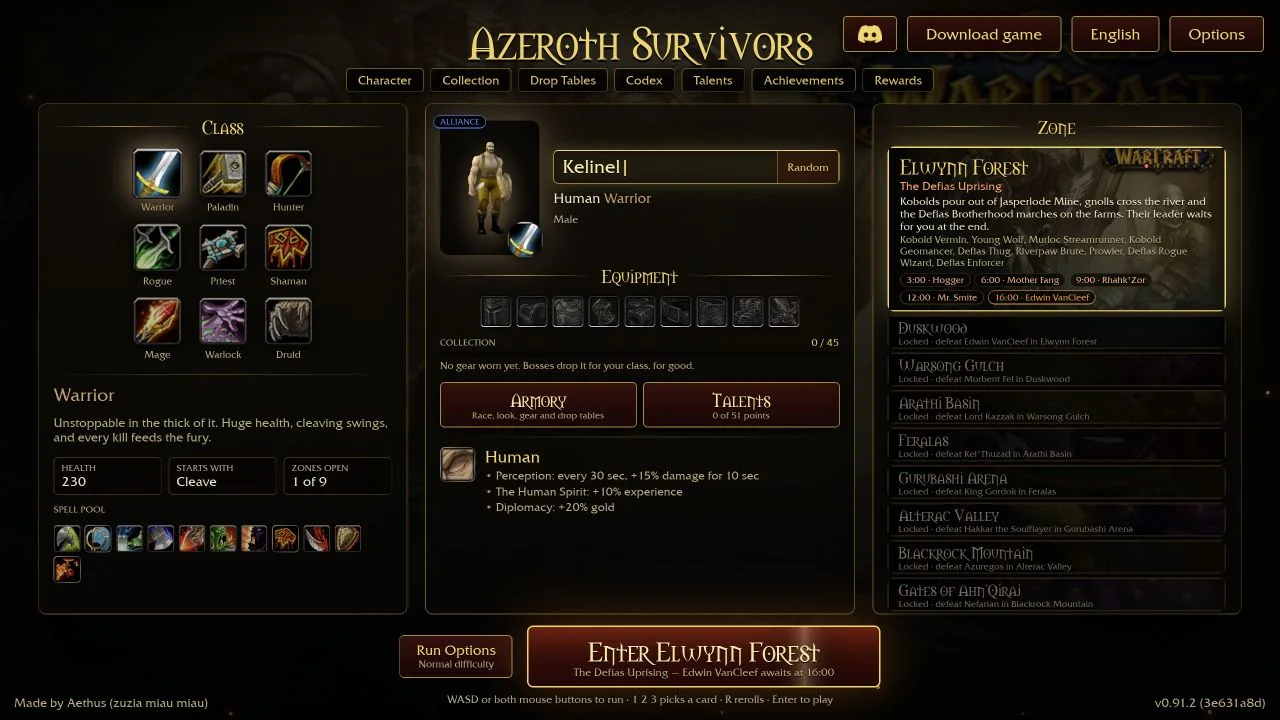
Azeroth Survivors shows its basic controls on the hero picker. In v0.103.1 (671c6f5e) the line reads: “WASD or both mouse buttons to run · 1 2 3 picks a card · R rerolls · Enter to play”. Your spells cast on their own, so the main keys move your hero and handle level-up cards.
Basic keyboard and mouse controls
| Action | Input | Where the game says so |
|---|---|---|
| Move | W, A, S, D, or hold both mouse buttons | Hero picker controls line |
| Pick a level-up card | 1, 2 or 3 | Hero picker controls line |
| Reroll the cards | R | Hero picker controls line |
| Start the run | Enter | Hero picker controls line |
| Leave the pause menu | Escape | Pause screen: “Press Escape to resume” |
| Buy a cache | Walk over it, or right-click it | “Right-click a cache to buy it.” and the Open Caches by Clicking option |
When you enter a zone, the screen says “Move to begin.” Rerolls are limited: the button shows how many free rerolls are left, or a gold cost.
Pause and menus
The pause screen is titled “Paused”. The menu text includes Resume, End Run, Main Menu and Quit game, and a “Sure? Press again” confirmation. The game text says to press Escape to resume. It does not say which key opens the pause screen. Escape is the likely key, but we have not confirmed it.
Menus use the mouse. In the Armory, right-click a piece to equip or unequip it, and Shift+Right-click to show it as that slot’s look. On the Talents screen, click a talent to spend a point and right-click to take it back.
How to rebind keys
Open Options → Key Bindings. The game’s hint says: “Click a key, then press the key, mouse button or wheel to bind to it. Right-click a key to unbind it.” Options has a Defaults button. The game says changes are saved at once and apply to your next run.
The list itself comes from the game’s data when the page opens. The files include one binding made for this game, named “open stored level-ups”. It opens the same stored level-ups as the Level Up! button described below. We could not read its default key.
Control options worth knowing
- Store Level-Ups: level-ups no longer stop the fight. They are stored, and a Level Up! button over your action bars opens them when you are ready.
- Open Caches by Clicking: caches are bought only when you right-click them, not when you walk over them. The game says this helps keep a run free of caches for Thrifty.
- Click-to-Move, mouse sensitivity and invert mouse: the game carries interface text from WoW 1.12, so these may not appear in the menu or work in a run. We have not checked them.
Gamepad controls
The game supports a gamepad. Its Options hint reads: “Left stick moves, right stick turns the view, A jumps, bumpers and triggers zoom, Y opens stored level-ups.” The Gamepad page lets you invert the camera’s X and Y axes and set camera speed, zoom speed and the stick dead zone. Raise the dead zone if the hero or the camera drifts on its own. We did not test a controller ourselves, so we cannot say how cards are picked on a gamepad without stored level-ups.
New to the game? Read your first run next. If the game will not start, see browser troubleshooting.
Questions
How do you move in Azeroth Survivors?
Use W, A, S and D, or hold both mouse buttons. On a gamepad, the left stick moves.
How do you pick a level-up card?
Press 1, 2 or 3 for the card, or R to reroll. The Store Level-Ups option keeps level-ups for later behind a Level Up! button.
Can you rebind keys?
Yes. Open Options → Key Bindings, click a key, then press the new key, mouse button or wheel. Right-click a key to unbind it.
Does Azeroth Survivors support a controller?
Yes. The game’s hint says the left stick moves, the right stick turns the view, A jumps, bumpers and triggers zoom, and Y opens stored level-ups.
Sources & scope
Read from the interface text in the game client v0.103.1 (671c6f5e) on 20 October 2026: the hero picker’s controls line, the pause menu, the Options pages and their hints. We did not play through every binding, and the full default list on the Key Bindings page is loaded from the game’s data at run time, so we could not read it from the files. Controls that are not printed in the game’s own text are marked as unverified.