Interface preview
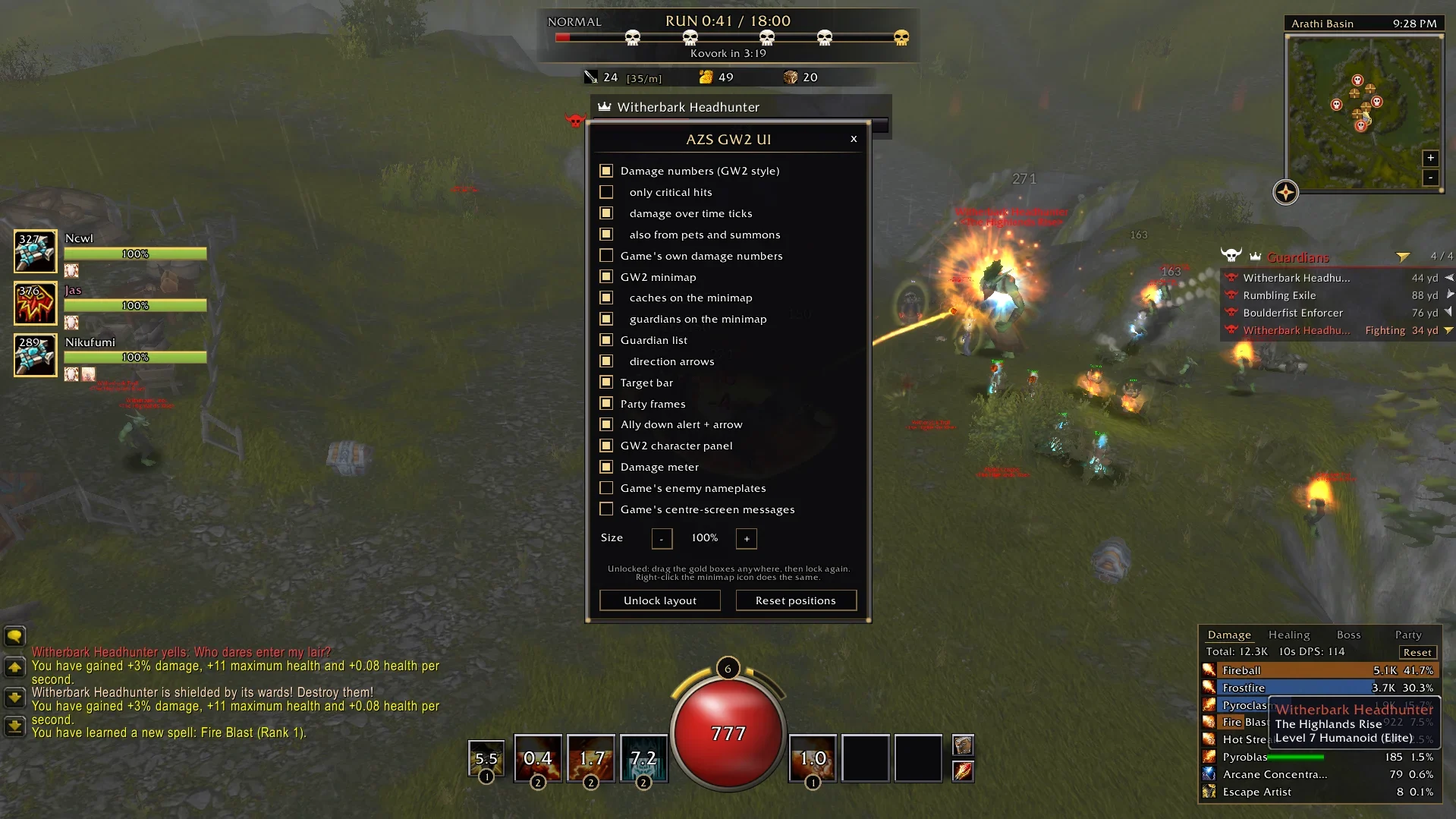
Author screenshot · CarolinDnB · Original on GitHub
Screenshots show the interface at the time the author published them; later releases may look different.
What is it useful for?
Use a Guild Wars 2-style health orb, skill bar and minimap, with movable trackers, a damage meter and co-op party frames.
Get started after installation
Install the addon using the current repository instructions, then follow the steps below. Commands and UI may change after an update.
- Download AZSGW2UI.zip from release Assets. Import it through Options → AddOns in a browser, or unpack it on Windows or Linux so AddOns/AZSGW2UI/AZSGW2UI.toc exists. Restart once so the client loads its textures.
- Use /gw2 config to choose panels. Enter /gw2 unlock to drag or resize them, then /gw2 lock when the layout is ready.
- To restore the game HUD, use /gw2 off. Use /gw2 on to switch back.
Useful tips & limitations
v2.0.1 documents per-frame layout sizing, Shift-drag grid snapping and /gw2 config. Party shield amounts depend on what the client reports; /gw2 partyinfo shows those readings.
- v1.9.1 fixes skill tooltips and limits its skull and cross markers to confirmed bosses and Guardians. Use /gw2 version when reporting a problem.
If a game update causes a problem, disable the most recently added addon and report the game version, addon version and exact error to its author.
Questions
What does AZSGW2UI do?
Use a Guild Wars 2-style health orb, skill bar and minimap, with movable trackers, a damage meter and co-op party frames.
What should I know before using it?
v2.0.1 documents per-frame layout sizing, Shift-drag grid snapping and /gw2 config. Party shield amounts depend on what the client reports; /gw2 partyinfo shows those readings.
Where can I find updates or report a problem?
Use the author’s repository and issue tracker linked below. Include your game version, addon version and full error message when reporting a problem.
Author & original sources
Features and instructions follow the author’s project below. Download addon packages through the author’s links.
- CarolinDnB/AZSGW2UI — repository & README
- Author issue tracker
- Author announcement on Discord
- AZSGW2UI 2.0.1 release
- AZSGW2UI 2.0.1 README
- AZSGW2UI v1.9.1 author notes
- AZSGW2UI v1.9.1 release
- AZSGW2UI v1.9.1 README
- Author screenshot source — CarolinDnB’s launch preview shows the settings panel, health orb and party frames in Arathi Basin. The image predates v1.9.1.
- Browser and desktop installation guide