Interface preview
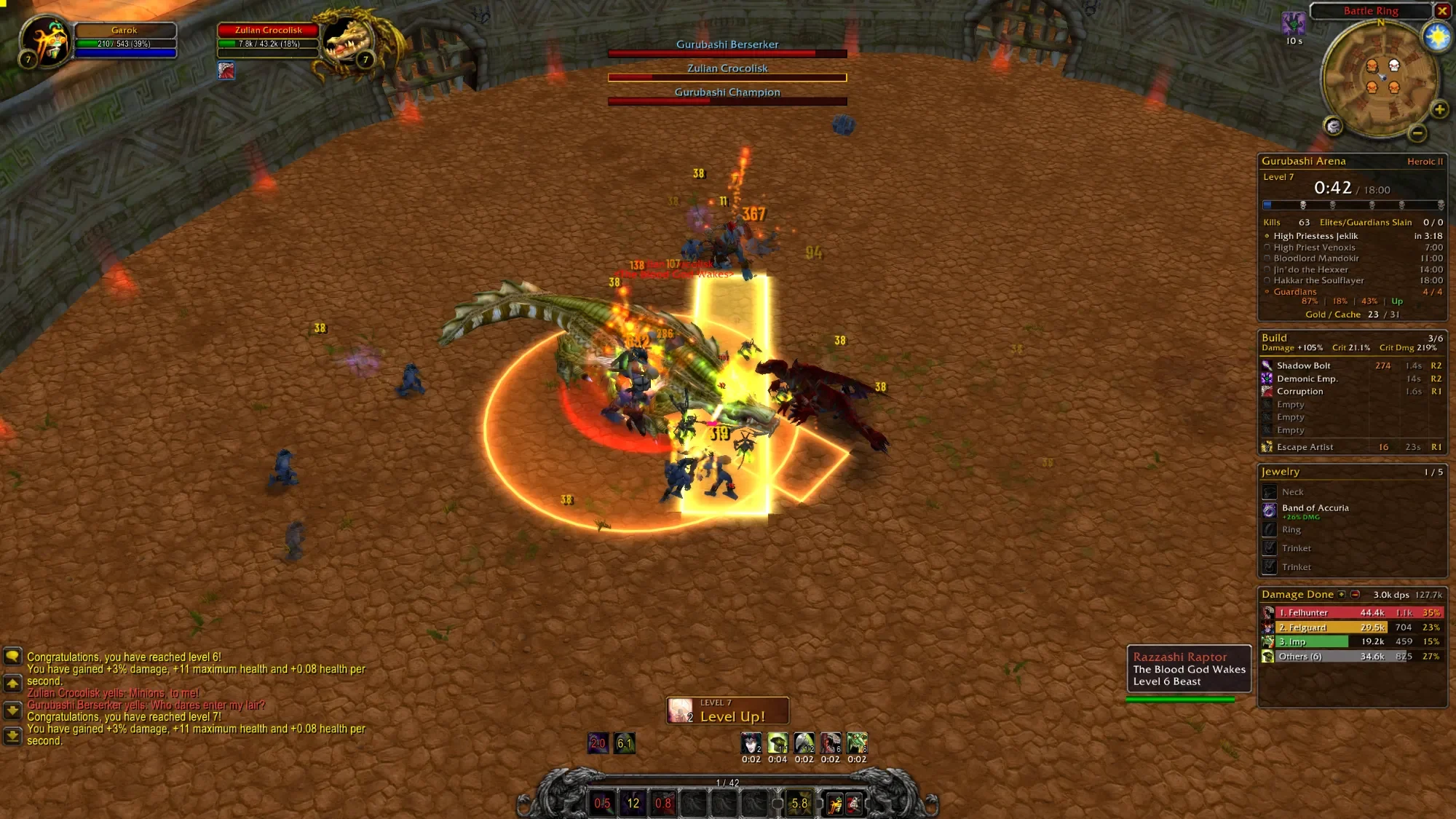
Author screenshot · morderous/survivorui-classic · Original on GitHub

Screenshots show the interface at the time the author published them; later releases may look different.
What is it useful for?
Keep the game’s classic appearance while adding movable frames, a run tracker, jewelry guidance, boss health and combat statistics.
Get started after installation
Install the addon using the current repository instructions, then follow the steps below. Commands and UI may change after an update.
- Download SurvivorUIClassic-0.2.22.zip and extract SurvivorUIClassic into benilla-config/AddOns, then restart. The Windows launcher is an optional alternative.
- Open /suic or left-click the minimap gear for options. Right-click that gear or use /suic move to arrange frames with grid snapping.
- In Boss bars and Nameplates, choose Off, Value, Percent or Both for health. Some ordinary enemies expose percentages only.
- Use the Guide’s gold exclamation mark on the minimap for jewelry and Luck pages. Hyper appears in blue after a Hyper run’s difficulty.
- Use /suic perf to sample frame rate and addon costs; Report saves the results and /suic perf off stops it.
Useful tips & limitations
v0.2.22 adds /suic perf. Classic works on its own. If Survivor UI is also installed, choose one with Change UI and restart; Survivor UI 3.0.44 or newer steps aside.
- It does not require Survivor UI. The launcher is separate from the addon ZIP; when switching between the two interfaces, close and reopen the game.
If a game update causes a problem, disable the most recently added addon and report the game version, addon version and exact error to its author.
Questions
What does SurvivorUI Classic do?
Keep the game’s classic appearance while adding movable frames, a run tracker, jewelry guidance, boss health and combat statistics.
What should I know before using it?
v0.2.22 adds /suic perf. Classic works on its own. If Survivor UI is also installed, choose one with Change UI and restart; Survivor UI 3.0.44 or newer steps aside.
Where can I find updates or report a problem?
Use the author’s repository and issue tracker linked below. Include your game version, addon version and full error message when reporting a problem.
Author & original sources
Features and instructions follow the author’s project below. Download addon packages through the author’s links.
- morderous/survivorui-classic — repository & README
- Author issue tracker
- Author announcement on Discord
- SurvivorUI Classic v0.2.22 release
- SurvivorUI Classic v0.2.22 README
- Author screenshot source — Author repository preview of a Heroic II Gurubashi Arena run: movable classic boss bars, run tracker, spell build, jewelry and meter.
- Browser and desktop installation guide