AZS Spell Meter uses the game’s damage totals, then adds spell kills, proc grouping, pet detail and separate windows. Choose the question you want answered: what dealt damage across the run, what finished enemies, what happened to the last boss, or what is doing damage now. Use the corresponding column and time window for that comparison.
Choose the view before comparing numbers
| View | What it answers |
|---|---|
| Damage | Damage dealt this run, with finishing kills per spell |
| Healing | Health actually restored; overhealing is excluded |
| Boss | The last boss encounter, retained until the next boss |
| Taken | Damage you received, split by its source |
| Party | Each hero’s contribution while playing co-op |
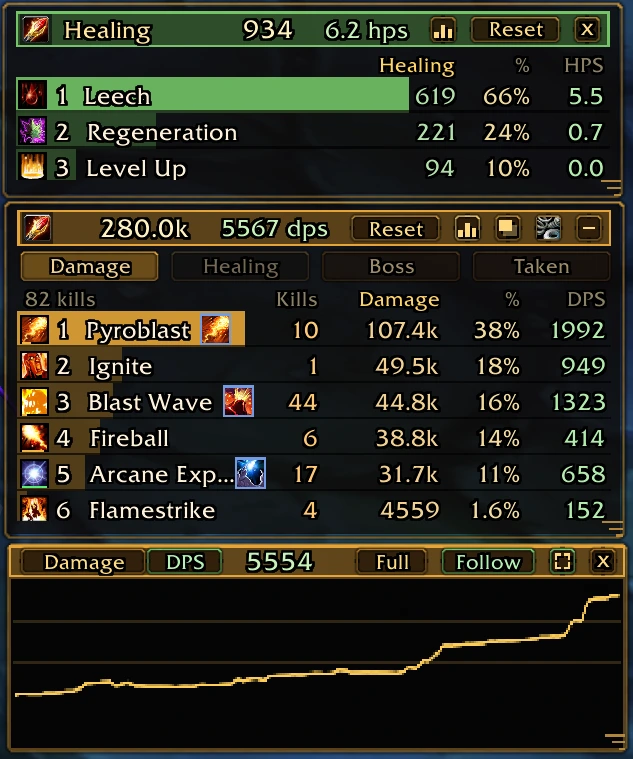
In the author’s screenshot, Pyroblast has 107.4k damage and 10 kills, while Blast Wave has 44.8k and 44 kills. The higher damage row did not finish more enemies. Click Kills, Dmg or DPS to sort, and click again to reverse the order.
Read each percentage and DPS with its denominator
Dmg is accumulated damage; Share is that row’s fraction of the selected total. DPS looks at a time window. The current 1.39.2 settings and rate calculation use 30 seconds when no window is saved, and allow 5 to 120 seconds. Hover the DPS total to see the active window, and use the gear button to change it. “Since the start” averages the full run or boss fight, or the period since you reset that view. Its clock pauses with the run.
Hover a spell for hits, crits and biggest crit. The displayed crit percentage is crits divided by recorded hits on that row. Hits and crits follow the meter line assigned by the game’s combat text. Kills instead use an enemy’s death message and go to the last meter line that hit it. Boss hit, crit and kill counts stay inside the current boss encounter.
Find a proc under the spell it casts
A grouped row can include a spell and the talents or items that trigger it. Pyroclasm’s explosion is grouped with Blast Wave, with a proc icon for its own numbers. Enable “Under the spell” to expand the grouped contributions. Enable “Each spell alone” to list spells, talents and items separately, keeping their kills on those rows.
Most proc relationships come from the origin supplied by the game, with exceptions added by kexo. In 1.39.2, Righteous Hammer belongs under Hammer of Wrath, and Lightning Overload’s kills are split between Lightning Bolt and Chain Lightning like its damage. Expanded talent rows also show their biggest crit on hover.
Pet and summon hits stay on the pet. Open Minions or Pets to inspect attacks rather than adding their numbers to your own same-named spell. Version 1.39.1 specifically keeps a Doomguard’s Shadow Bolt separate from yours and retains each minion attack’s kills.
Keep Party or Healing beside your damage
Right-click a view button to detach it. Each extra window keeps its own size, position and Reset; click the dimmed original button or its close button to return it. In Party, open a hero to inspect spells, healing and boss damage, then use Back. The sword/healing icon switches party damage and healing done. Hover a hero’s strongest spell for its description.
The chart button opens a graph for that view. Scroll to zoom, drag to pan and hover for a value at that time. Full shows the whole run; Follow keeps the live end visible. The built-in Damage Done window is hidden while any meter window or its bubble remains open, and returns when all are closed if it was previously enabled.
Reset the intended view and recover missing windows
Reset starts the current view over without clearing the built-in meter. Resetting Damage also clears its kills; resetting Healing, Boss, Taken or Party keeps your own damage and kills. “Reset settings” restores appearance settings while keeping numbers and positions. Version 1.39.1 retains kills across reloads within the same run, so reopening the page is different from explicitly resetting Damage.
/azsmshows or hides the meter;/spellmeteris an alias./azsm resetposbrings a missing window back on screen. Deleting the addon folder does not clear its saved position./azsm resetrestarts the selected view./azsm locktoggles dragging.
Sources & scope
kexo’s 2 and 3 November 2026 Discord updates; AZS Spell Meter 1.39.2 README, release notes, UI source and author preview at commit e4147f8.
- kexo: game v0.139.0 combat-text attribution update, 2 November 2026
- kexo: proc grouping and biggest-crit update, 3 November 2026
- kexo: built-in meter comparison and features, 3 November 2026
- AZS Spell Meter 1.39 release notes, 2 November 2026
- AZS Spell Meter 1.39.2 release notes, 3 November 2026
- kex0/AZSSpellMeter README at e4147f8, checked 3 November 2026
- AZS Spell Meter 1.39.1 release notes: pet attribution, run kill persistence and independent rows
- AZS Spell Meter 1.39.2 UI source: DPS defaults, tooltip denominators and reset behavior, commit e4147f8
- kex0: author screenshot in the AZS Spell Meter README, commit e4147f8
- kex0: original AZS Spell Meter preview image