If you installed SurvivorsForge 0.6.0, 0.6.1 or 0.6.2 through the Microsoft Store, update the manager to 0.6.3. Rezondes made this request on 4 November 2026 as the Store update route came online. Players already using the separate download do not need to switch to the Store.
Choose the update route for your installation
SurvivorsForge manages Azeroth Survivors addons in the game’s AddOns folder. Its own version is separate from the versions of the game and each addon.
| Your installation | What to do |
|---|---|
| Microsoft Store, 0.6.0 to 0.6.2 | Update to 0.6.3 through the Store, or use the downloaded installer as Rezondes directs. |
| Separate Windows ZIP download | Keep that channel if it suits you. There is no requirement to move to the Store. |
| Launcher older than 0.4.0 | Download the launcher again from the author’s homepage. Old clients look for asset names no longer supplied after 0.6.0. |
Store releases can appear later than GitHub releases because Microsoft verifies each version. A new GitHub tag therefore does not mean the Store will offer it immediately. Windows also keeps Store and ZIP installations’ settings separate; after switching channels, check the selected AddOns folder.
Update the manager and check its folder
- Open Settings and read the launcher version. For Store versions 0.6.0 to 0.6.2, use the Microsoft Store listing in Sources to obtain 0.6.3 when available. Rezondes also allows updating with the downloaded installer from the author’s download route.
- Restart SurvivorsForge and check its version again. From 0.6.3, the author says subsequent launcher updates will be offered inside the launcher. Store installations obtain those updates through the Store; separate Windows downloads use the GitHub release route. The documented update banner is Update and restart.
- In Settings, confirm the AddOns folder belongs to the game installation you actually play. The README’s example is
benilla-config/AddOns. If it has not been created yet, start the game once before selecting it.
Keep the game version field in Settings matched to your game. SurvivorsForge uses it for addon compatibility warnings; updating the manager alone does not establish that every addon supports a new game patch.
Check addon updates separately
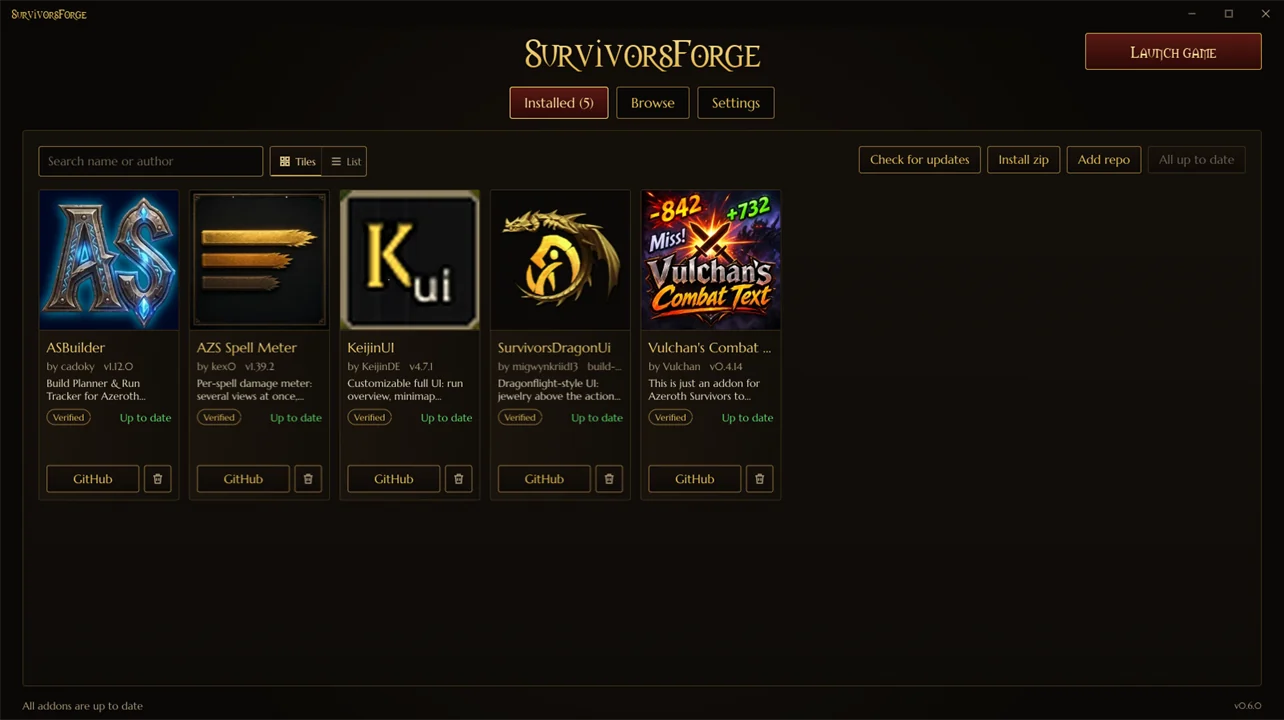
Open Installed → Check for updates, review what is available, then use Update all. Updates requiring confirmation are skipped by Update all and handled individually. Addons installed from a local ZIP have no automatic source check; install their new ZIP yourself.
The launcher’s own update banner and the Installed page serve different jobs. A manager updated to 0.6.3 can still contain older addons. The addon directory and installation guide helps identify which addon you want to maintain.
Make one ZIP for the browser game
Browser players can build an addon pack on the website or in the launcher. You do not have to use the desktop manager to create a website pack.
- In the launcher’s Browse page, tick at least two addons.
- Choose Save as zip for a local package, or Share as link for a pack page that lists its contents and provides the same ZIP.
- Alternatively, use the website’s Create a pack page in Sources to assemble the pack there.
- In the browser game, use Options → AddOns → Install AddOns to select the ZIP, enable the addons and start the next run.
A pack keeps each addon in its own folder inside one ZIP. A single addon downloads from its own page; packs require at least two.
Windows, Linux and the Mac discussion
The 0.6.3 release supplies a Windows ZIP and a Linux AppImage. Its README lists Windows 10/11 and Linux x64 with glibc 2.35 or newer; Linux and Steam Deck support remains experimental. On Linux the launch button starts a native game build. Start a Windows build under Proton through Steam.
The 4 November Mac discussion was still about making support possible: Rezondes said they were unsure how the game worked on Mac, and Mxgwyn volunteered to help. Version 0.6.3 has no Mac release package.
Sources & scope
Rezondes’s 3 and 4 November 2026 Discord announcements, the pinned 0.6.3 release and README, and the Microsoft Store listing.
- Rezondes: Microsoft Store launch, 3 November 2026
- Rezondes: required 0.6.3 update for Store 0.6.0–0.6.2 installs, 4 November 2026
- SurvivorsForge 0.6.3 release: Windows ZIP and Linux AppImage
- SurvivorsForge 0.6.3 README: updates, launcher pages, Store packages and addon packs
- SurvivorsForge: author download homepage
- SurvivorsForge: Microsoft Store listing
- SurvivorsForge website: create an addon pack
- Rezondes: Mac support discussion, 4 November 2026
- Mxgwyn: volunteer offer in the Mac discussion, 4 November 2026
- Original browser game: addon ZIP installer