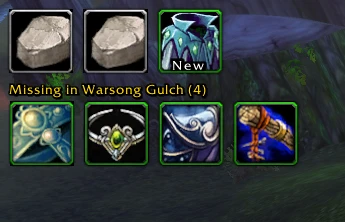
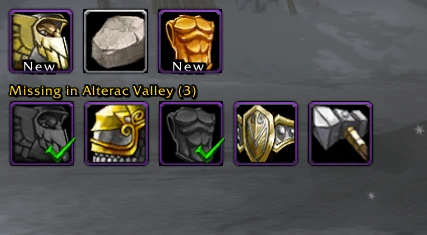
ASDrops keeps the loot from your current Azeroth Survivors run on a small icon bar, with a second row for items still missing from the current zone. It is useful when a boss reward disappears into chat and you want to remember what dropped before choosing the next zone to farm.
Valorless introduced it on 2 November after struggling to keep track of drops. The documented release is v1.5.7, published later that day. Start by checking its collection marks against your own Armory: ASDrops learns from loot messages and windows, and cannot read your existing collection directly.
Set up the rows before your next run
- Download
ASDrops-v1.5.7.zipfrom the author’s release. Follow the documented folder installation: copy theASDropsfolder into your game’sAddOnsdirectory, restart or reload the UI, and enable the addon. The installation guide explains how to locate the active game folder. - Open
/asdrops, or use its minimap button. Leave the loot bar and missing-items row enabled while arranging them. - Drag each row by an icon. Drag its bottom-right grip to change icon size, then right-click to lock it. Position and size are saved.
- For a checklist that keeps completed items visible, enable Show collected items. You can then enable Greyscale collected items and Green checkmark on collected items. These three options start off; the last two require the first.
- Enter the zone you want to track. Compare the row with your known collection and mark older acquisitions before using the remaining count to plan another run.
Read drops, rocks and the missing count
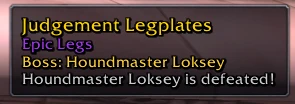
The main bar holds up to 20 loot icons, with rarity-coloured borders, stack counts and tooltips. It also reads the game’s new/already-collected loot messages. A boss kill with no item gets an A Pretty Rock placeholder, with the boss named in its tooltip.
The missing row remembers items seen in loot chat and loot windows, saved per zone, and can also use ASDropsZoneData.lua. v1.5.7 sorts it by boss order where boss information exists. When collected items are visible, the heading still counts only missing items; /asmissing list likewise lists the missing entries.
Correct old collection marks without deleting targets
On a missing-row icon, Shift + left-click marks it collected. Shift + right-click removes it from that zone’s list, which is a different action. Use the collected mark for an item you already own and still want represented in the checklist.
| Task | Documented command |
|---|---|
| Check current-zone totals and missing entries | /asmissing list |
| Mark an older acquisition | /asmissing collected <item> |
| Undo a collected mark | /asmissing missing <item> |
| Add a known target with its item link | /asmissing add <item link> |
The collected and missing commands accept an item link, item ID or name. Keep the current zone in mind: these commands edit that zone’s remembered list. If the backpack shows the same icons, that is ASDrops’ visual mirror; it does not add items to your real inventory.
Check Scholomance against the current game
On 4 November, Raven asked the author for a Scholomance update. The latest published ASDrops release remains v1.5.7 from 2 November. For this zone, use the current Scholomance reference to check boss drops alongside the addon’s list.
Aethus changed Scholomance armor loot in game v0.141.0: a boss drops one of its two pieces half the time, and a successful drop prioritizes a piece missing from your game collection. With neither piece owned, each has a 25% chance; with one owned, the missing one has the full 50% drop chance. Gandling retains a 25% weapon roll, giving both weapons together to classes with a pair. Those decisions use the game’s collection; an ASDrops manual checkmark updates its own list.
When a reward fails to appear
ASDrops listens to loot chat and boss-kill banners, and can read SDUI’s loot frame when available. If a reward is absent after changing chat or loot UI, check that combination first. /asdrops debug prints the recorded drops and bar state; /asdropsbag debug inspects the backpack mirror. Include the game version, ASDrops version and the reward that went missing when reporting the problem.
Azerloot tooltip integration is still listed as planned in this release. For a separate item-and-boss reference or wishlist, open Azerloot’s guide; for this run’s compact loot record, use ASDrops’ controls.
Questions
Does ASDrops know everything I already collected?
It cannot read the existing game collection. Mark older items manually in the current zone or let the addon register them when they drop again.
How do I keep collected items visible?
Open /asdrops and enable Show collected items. Greyscale collected items and Green checkmark on collected items become available after that.
Does marking an item change Scholomance loot priority?
The manual mark updates ASDrops’ list. Game v0.141.0 decides missing-item priority from the game’s collection.
Sources & scope
Valorless’s 2 November announcement, pinned README and v1.5.7 release; Raven’s 4 November Scholomance request and Aethus’s v0.141.0 notes.
- Valorless: ASDrops announcement and original screenshots, 2 November 2026
- Valorless: why the drop table is learned from loot, 2 November 2026
- Valorless: ASDrops README at e1f0f4a65
- Valorless: ASDrops v1.5.7 release, 2 November 2026
- Raven: Scholomance update request, 4 November 2026
- Aethus: official v0.141.0 Scholomance loot rules, 4 November 2026
- Valorless: collected-item screenshot, 2 November 2026